Page Overview #
Contents #
✅ Enable of the function #
Status of the function #

This status message shows the current state of the weight control function, helping the operator understand whether the system is ready, active, or requires action.
Status Messages:
- Disabled
The weight control function is currently turned off. No automatic adjustments will be made. - Ready
The system is prepared to activate weight control but has not started adjusting yet. The reference data is set, and the system is standing by. - Weight Control is active
The function is fully operational. Reference values are valid, and the system is actively adjusting parameters to stabilize part weight. - Inactive / Injection Recipe Data Change / New Reference Shot Needed
The function is temporarily inactive due to one of the following reasons:- No reference data is available
- Injection parameters (such as speed, pressure, or time) have been changed
- A new reference shot must be set to resume weight control
Cycle Data #
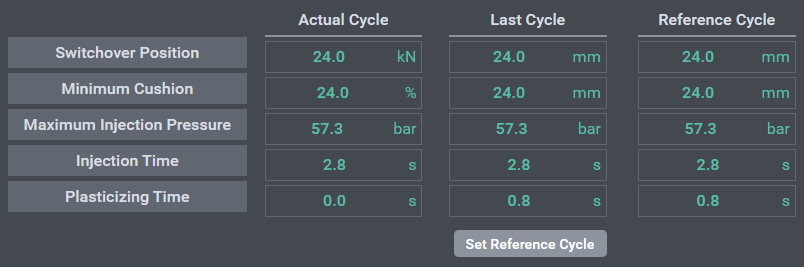
- Actual Cycle
Displays real-time data from the currently running cycle. All values begin at zero at the start of each cycle and update as the cycle progresses.
- Last Cycle
After the injection process is completed, the data from the Actual Cycle is automatically copied here.
- Reference Cycle
- With the button “Set Reference Cycle”, the value on “Last Cycle” will be copied to “Reference Cycle”.
- Reference Cycle contains the predefined reference values used to stabilize product weight. These target values help ensure consistent shot weight.
- Button : Set Reference Cycle
- The Set Reference Cycle button is used to copy the data from the Last Cycle into the Reference Cycle.
- Purpose
- This function is used to update the reference values that help stabilize the product weight and ensure consistent quality during production.
Button : Set Reference Cycle #
- The Set Reference Cycle button is used to copy the data from the Last Cycle into the Reference Cycle.
- Purpose:
- This function is used to update the reference values that help stabilize the product weight and ensure consistent quality during production.
- When to Use:
- After a stable and acceptable injection cycle has been completed
- When setting up a new mold or production condition
- When any injection parameters are changed
- How It Works:
- Complete an injection cycle with satisfactory results.
- Review the values in the Last Cycle column.
- Click the Set Reference Cycle button.
- The values from Last Cycle will be copied to Reference Cycle and used as the new target for weight control.
Adjustment Method and Intervention Limits #

This section allows the user to select automatic adjustment method and set intervention limits for the process.
Adjustment Method #
- ✅ Adjust Switchover Point
When this option is enabled, the system is allowed to automatically adjust the switchover position during the injection phase.- If the switchover type is position-based, the value will be adjusted in millimeters (mm).
- If the switchover type is time-based, the input field changes to reflect a time setting (seconds).
- ✅ Adjust Holding Pressure Level
When this option is enabled, the system is allowed to automatically adjust the holding pressure level during the packing phase. The adjustment is made in percentage (%) relative to the current setting.
Intervention Limits #
- Defines the maximum range within which automatic adjustments are allowed.
- For holding pressure, the limit is shown as a percentage (e.g., 10.0%), meaning the function can increase or decrease the holding pressure level by up to 10% from the user setting.
- For switchover point, if enabled, the limit is shown in millimeters (e.g., 10.0 mm) or seconds depending on the switchover type.
Trend Graph – Switchover Point & Holding Pressure Adjustment #
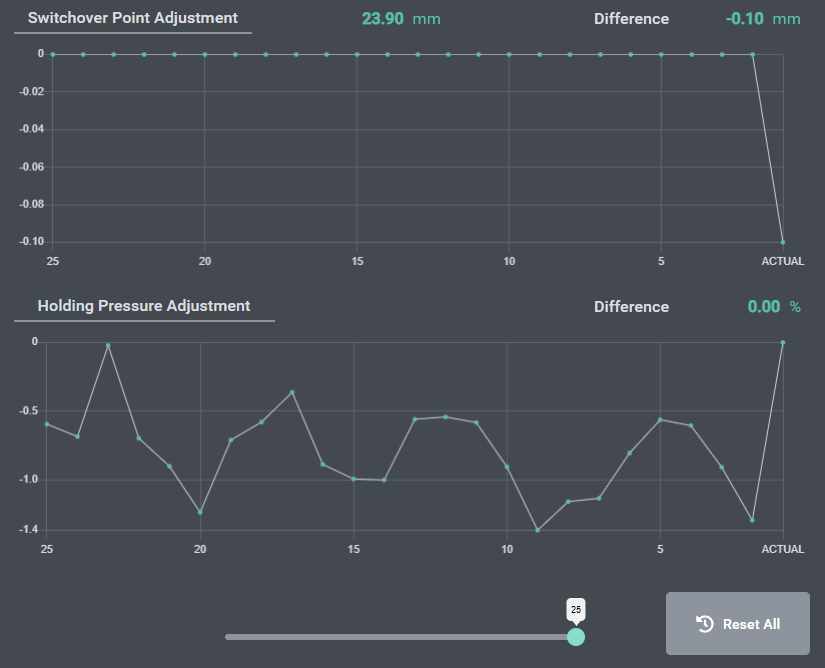
This graph shows the trend of the last 25 production cycles, visualizing how the system has automatically adjusted process parameters to stabilize product weight.
Switchover Point Adjustment #
- The graph displays the adjusted switchover position for each of the last 25 cycles.
- The current adjusted switchover point is 49.96 mm, with a difference of -0.64 mm compared to the user-defined reference value(50mm).
- This means the system has reduced the switchover point slightly to stabilize product weight.
Holding Pressure Adjustment #
- This graph displays how much the holding pressure was adjusted (as a percentage) relative to the user setting.
- In this example, the system applied a consistent -10.00% holding pressure adjustment, indicating that a lower pressure was used to maintain stable part weight.
Cycle Range Selector #
- The slider below the graph allows users to change the number of displayed cycles, ranging from 25 to 250.
- This helps in analyzing short-term or long-term trends in parameter adjustments.
Button “Reset All” #

The Reset All button is used to initialize all stored data and reference cycle data.
Functionality: #
- Clears all historical data on the trends.
- Resets the Reference Cycle values.
- Useful for starting fresh after process changes, mold changes.
Important Note:
Use this function with caution, as all current reference data and adjustment history will be permanently deleted.


