In DL models, when the mold closing process is performed using two pumps, an issue can occur after the mold is closed and the system attempts to close the halfnut.
During this step, the spring force inside the clamping unit may push the moving platen slightly backward, causing the mold to move away from the closed position. As a result, the halfnut cannot be closed properly, leading to process instability or machine errors.
The Spring Mold function prevents this issue by keeping Pump 1 continuously applying pressure against the spring even after the mold is closed. This maintains the correct mold position and ensures that the halfnut can close reliably and smoothly.
Software Firmware : DL
1. Spring Mold Concept #
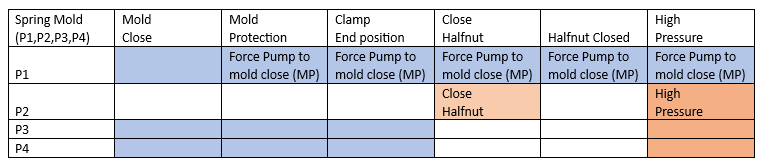
1.1. Process (P1, P2) #
■ Overview #
- The mold is closed using pumps P1.
- Once the mold reaches the Mold Protection Position, the SpringMoldMode becomes active.
■ Process Steps #
- Mold Close
- Pumps P1 operate to close the mold. (Depending on the pump selection, but works only with 1 pump selection)
- When the mold reaches the protection position, Spring Mold mode starts.
- Mold Protection
- Pump P1 continues pushing against the spring.
- Move Tiebar
- If necessary, pump P2 drives the tiebar forward to reach to the halfnut locking position.
- Close Halfnut
- Pump P2 closes the halfnut while pump P1 still pushes against the spring.
- Clamp End Position
- The mold reaches the fully closed position and clamping is maintained.
- Buildup Tonnage
- Pump P1 maintains the mold protection pressure while building up clamping tonnage.
- If needed, pump P2 continues to drive the tiebar forward to achieve tonnage.
- High Pressure
- Once the target tonnage is reached, SpringMoldMode is deactivated.

1.2. Process (P1, P2, P3, P4) #
■ Overview #
- The mold is closed using pumps P1, P2, P3, and P4.
- Once the mold reaches the Mold Protection Position, the SpringMoldMode becomes active.
■ Process Steps #
- Mold Close
- Pumps P1, P3, and P4 operate together to close the mold.
- Once the mold reaches the protection position, Spring Mold mode starts.
- Mold Protection
- Pump P1 pushes against the spring to maintain protection.
- Move Tiebar
- If necessary, pumps P2, P3, and P4 drive the tiebar forward to continue mold closing.
- Clamp End Position
- The mold reaches the fully closed position and clamping is maintained.
- Close Halfnut
- Pump P2 closes the halfnut.
- Buildup Tonnage
- Pump P1 maintains protection pressure while clamping tonnage builds up.
- Pumps P2, P3, and P4 can support additional movement if required.
- High Pressure
- Once the required tonnage is reached, SpringMoldMode is deactivated.
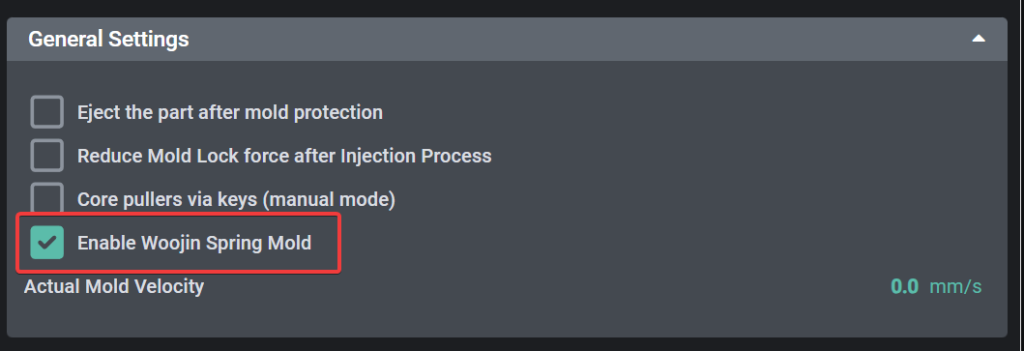
2. Enable on Machine Setting (Mold General) #
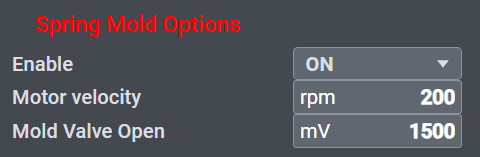
During the mold protection phase, while the system is pressing against the spring, you can configure the following parameters:
Motor Velocity (rpm):
Sets the operating speed of the pump while it is applying pressure to the spring during the mold protection stage. (Applied to Pump 1)
Mold Valve Open (mV):
Sets the proportional valve opening level, which controls the flow rate of hydraulic fluid during spring compression.
3. Enable on User Page (Mold Settings) #